In my last article I explained how to identify a specific GPS Point in your data. In this article,
I’m going to explain how to use a GPS Point. I’m using AIM RS3 Analysis but it is possible to do it in any data software that allows you to write math channels. If you haven’t read my previous article, you can find it here:
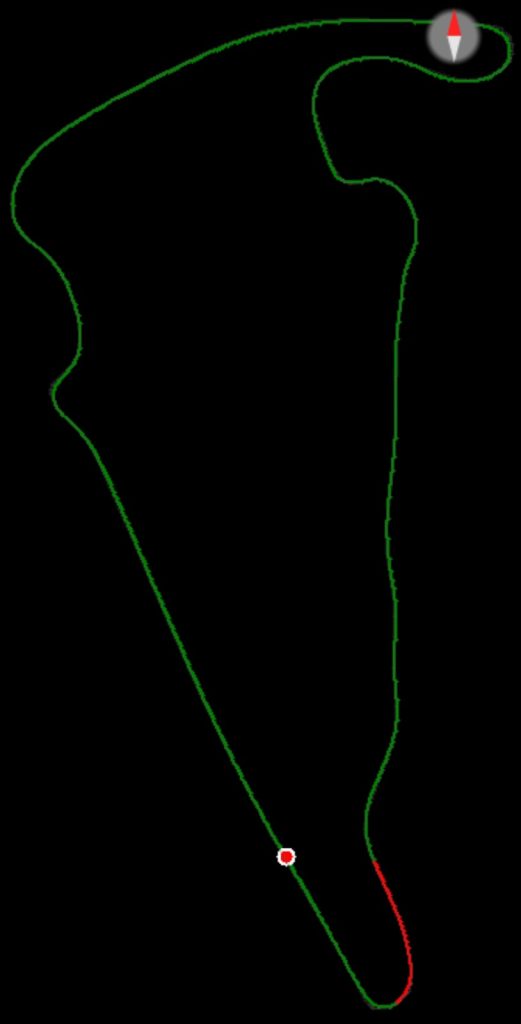
Consistency is often talked about in relation to lap time and this certainly is a good way of telling if a driver is consistent. However, if you want to determine if a driver is consistently braking at the same spot for a corner, then that becomes a little more difficult. You could overlay a bunch of laps and then measure distances using a datum cursor to figure this out but using a GPS Point and a Channels Report makes this process a lot easier (once all of the math channels are created) and I believe it is more accurate as well. I’m going to perform this exercise for the braking at Turn 11 at VIR. Exhibit 1 shows the section (in red) of the track that I’m going to be looking at.
Exhibit 1
I’m going to be using the same GPS coordinates that I used in my last article – GPS Lat: 36.5539077 and GPS Lon: -79.2049002. This point is a little before the driver gets on the brakes for Turn 11. Exhibit 2 shows the GPS Point in red on the track map and in pink on the Time/Distance graph.
Exhibit 2
I am using AIM RS3 Analysis software and please note that although the graph shows the Longitudinal coordinates as positive, in reality they are negative and, in the calculations, I had to make them negative. The cursor is at the point for which the distance is zero (or at least very close to it). This is just before the brake point at turn 11 at Virginia International Raceway.
Now we are getting closer to identifying the specific point! At that point I want a formula to return a 1 every time the car crosses or at least gets really close to that point. Exhibit 2 shows the fastest 6 laps overlayed with my cursor on the target GPS point.
Exhibit 3
However, the driver applied and released the brakes several times, with the last application actually being for Turn 12. In order to have the brake switch active for the duration of the braking, I used this math channel: COND_VALID_AT_LEAST(“Brake Switch”[#], True, 1, 50). This specifies that the Brake Switch math channel needs to be active for at least 50 samples of data. This is shown in purple on the time/distance graph and in red on the track map in Exhibit 4.
Exhibit 4
In Exhibit 4 I have zoomed in to this point and you will see that it actually does not end up being a specific point. The driving lines shown on the left make it plainly apparent as to why it can’t be a specific point.
Exhibit 4
The last area that needs to be identified is the point where the GPS Point starts to the point where braking starts. The GPS Point Rising Edge math channel has already been discussed above and I created a Brake Point Rising math channel that works the same as the GPS Point Rising math channel — a 1 is returned at the point where the driver reaches 20 psi of brake pressure.
If the GPS Point Rising Edge math channel returns a 1 at the start of the GPS Point and the Brake Point Rising math channel returns a 1 when the driver first gets on the brakes, then the value of the two math channels added together will be 1 at the start of the GPS Point and 2 when the driver applies the brakes. Therefore, the gap between them can be identified when the addition of them equals 1. This is the math channel for the Brake Point Rising Edge trace: LAP_EDGE_COUNTER(“Brake Switch Cond”[#], Rising) And this is the math channel for the GPS Point to Brake Point math channel: “GPS Point Rising Edge”[#] + “Brake Point Rising Edge”[#] == 1 In Exhibit 5, these three traces are shown with the two GPS traces in pink, the two brake point traces in purple, and the trace indicating the gap between the start of the GPS Point and the start of braking shown in green. The gap between the GPS Point and the start of braking is shown in red on the track map.
Exhibit 5
Stick with me, I’m almost there! All I need now is the distance from the GPS Point to the Braking Point. I want to calculate the distance only when the GPS Point to Brake Point trace is equal to 1. Therefore, this is the math channel that I used to do this: IF(“GPS Point To BP”[#] == 1, LAP_INTEG(“GPS Point To BP”[#])* (“GPS Speed”[mph]/3600) *5280,0). This states that if the GPS Point to Brake Point is equal to 1, then take the integral of the GPS Point to Brake Point value and multiply it by the formula to get feet from mph. Exhibit 5 shows this trace in green on the time/distance graph and in red on the track map.
Exhibit 6
Now that I have this distance calculation, I can look at the values for all the laps in a Channels Report. But before I do that, I just want one other math channel to be included in that Channels Report. I want to measure the time that it takes from the GPS Point to the Braking Point.
This is the math channel: LAP_INTEG(“GPS Point To BP”[#]). It is the same as the math channel that is used to calculate the distance except it doesn’t need to be multiplied by the formula that returns feet from mph. Exhibit 7 shows the Channels Report that includes both of these math channels.
Exhibit 7
As can be seen, the driver in this case was not only turning very consistent lap times, they were also braking at about the same point each lap for turn 11 at VIR. This is especially clear if you look at the time to the brake point. Lap 4 had the fastest segment time and the Channels Report is showing that the driver braked slightly later but I do believe that this is within the margin of error.
You can take this approach even further by determining exactly at what point the driver gets to throttle or gets to full throttle. I keep finding different ways to use GPS Points – last weekend I used them to identify the Pit Entry and Pit Exit points at COTA so that I could measure the distance that the driver drove when coming into the pit box.
If you would like these math channels, you can download them here: