
How to Identify a GPS Point in Your Data
How to Identify a GPS Point in Your Data
Every once in a while, the method of how to do something that you have been trying to do forever, suddenly drops in your lap. This was the case for me in regard to identifying a specific GPS point in data. I recently learned of a way to do this, and this opens up a number of possibilities when analyzing the data. The main way that I want to use it is to be able to calculate distances from a specific GPS point, such as the distance to the initial braking point for a corner, the distance to the point that the driver releases the brake pedal, the distance that the driver starts to go to throttle or even the distance that the driver gets to full throttle at a particular corner. But you could also create GPS points for the brake markers at a corner or at least the brake marker that the driver is using as a reference for brake application. The process is a little complicated but once you have everything created, it is easy to use.
I have tried many times to create a GPS point in the data before and I was never successful. My logic was that if GPS Latitude equals X and GPS Longitude equals Y then return a 1 as a flag. It made sense to me, but it unfortunately doesn’t work. I think the reason for this is because it is almost impossible for the car to be at the exact same spot every lap. To get around this you need to calculate the distance between two GPS points. In this case, you want to measure the distance between the GPS coordinates of the point that you want to use and the GPS coordinates of the point where the car is on the track. This is the part that I recently learned. This seems to work well although there are always going to be some inaccuracies. There is all sorts of information on the internet about measuring the distance between two GPS coordinates and there are even calculators that you can use. I found that this website explained it rather well: Distance calculation And these are the formulas from that webpage that I’m using to calculate the distance:

Lat1 and Lon1 are the coordinates for the GPS Point that you want to identify and Lat2 and Lon2 are the coordinates for which the car is located as shown in the data, so these are replaced with the GPS Latitude and GPS Longitude channel names. Exhibit 1 shows the distance between the two coordinates calculated along with GPS Latitude and Longitude. The value that I’m using for Lat1 is 36.5539077 degrees and Lon1 is -79.2049002 degrees.

I am using AIM RS3 Analysis software and please note that although the graph shows the Longitudinal coordinates as positive, in reality they are negative and, in the calculations, I had to make them negative. The cursor is at the point for which the distance is zero (or at least very close to it). This is just before the brake point at turn 11 at Virginia International Raceway.
Now we are getting closer to identifying the specific point! At that point I want a formula to return a 1 every time the car crosses or at least gets really close to that point. Exhibit 2 shows the fastest 6 laps overlayed with my cursor on the target GPS point.
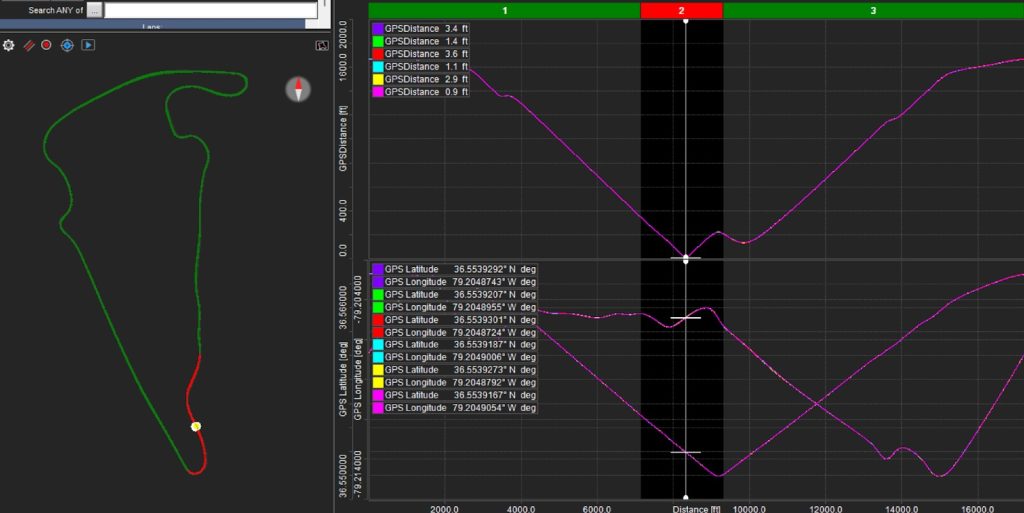
The distance values for each lap are shown in the upper left-hand corner. You can see that none of them are 0. In fact, they range from .9 ft to 3.6 ft. Therefore, to ensure that I capture this point for every single lap, I need a tolerance value of at least 3.6 ft. In this exercise, I used a tolerance value of 5 ft. Therefore, the logic for my GPS Point formula is: Return a 1 whenever the GPS Distance is between 0 and 5 ft. Exhibit 3 shows the GPS Point on the graph for the fastest 6 laps.

In Exhibit 4 I have zoomed in to this point and you will see that it actually does not end up being a specific point. The driving lines shown on the left make it plainly apparent as to why it can’t be a specific point.

It is a range, and this is one of those inaccuracies that I mentioned before. The pink trace is the widest point and measures 34.9 feet from the start of the point to the end. At the speed that the driver was going, it took him .239 seconds to cover that distance. That is certainly not a lot of time, but we can make it even smaller. If I measure the distance between the point where the pink trace goes to 1 and the point where the purple trace goes to 1then that distance is only 8.1 ft and only .056 seconds! Therefore, all that needs to be done is to identify the moment where the GPS Point initially goes from 0 to 1 (the Rising Edge). AIM has provided a math channel function that allows us to do just that. The math function is LAP_EDGE_COUNTER(“GPS Point”, Rising). This value resets after every lap and it stays at the value of 1 until the end of the lap. You can also choose Falling if you want to capture the Falling Edge of the GPS Point. Exhibit 5 shows the GPS Point Rising Edge graphed.

I recognize that there is a lot to digest so I’m going to stop here but stay tuned because in my next article, I’m going to explain more about how to use this newfound information!
If you would like to have the AIM math channels that I used in this exercise, you can download them here: GPS Point AIM Math Channels
Good luck in your races!!